

Information Technology Infrastructure is the system that keeps a business running behind the scenes. It includes the tools, devices, and systems your company uses every day to store data, connect teams, and run operations. Most businesses rely on it more than they realize. Emails, files, software, and internet access all depend on it working well. When it breaks, work slows down or even stops. Problems like system downtime, slow internet, or missing files often come from a weak setup. That can affect sales, customer service, and daily tasks.
In this guide, we’ll cover what IT infrastructure is, what it includes, and how your company can set it up in a simple, practical way.
What Is IT Infrastructure?
Information Technology Infrastructure refers to all the systems that support your business technology. It is what allows your computers, software, and networks to work together.
In simple terms, it is the setup that keeps your business connected and running.
It usually includes computers, software, internet systems, and data storage. All these parts work together so employees can do their jobs without delays. Think of it like the backbone of your business technology. Without it, most digital work would stop.
Main Parts of IT Infrastructure
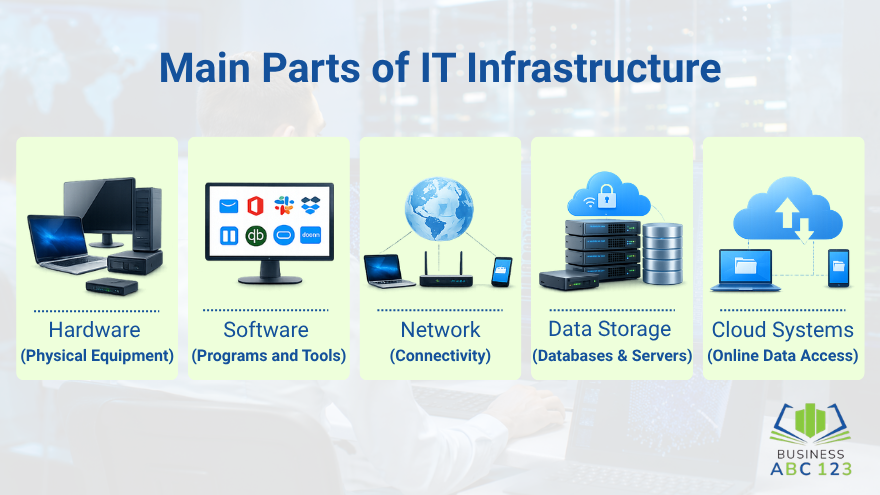
Every business setup has a few key parts. Let’s break them down in a simple way.
1. Hardware (Physical Equipment)
This includes all physical devices your company uses.
- Computers and laptops
- Servers
- Printers
- Network devices like routers
These are the tools people use every day to get work done.
2. Software (Programs and Tools)
Software helps run tasks and manage information. Many of these are also considered must-have business technologies for companies handling daily operations and communication.
- Email systems
- Accounting tools
- Business apps
- File management systems
Without software, hardware alone cannot do much.
3. Network (Internet and Connections)
The network connects everything together.
- Internet connection
- Wi-Fi systems
- Internal office networks
If the network is weak, everything slows down.
4. Data Storage (Where Files Are Kept)
This is where your business data is stored.
- Local storage on devices
- External hard drives
- Cloud storage systems
Good storage keeps files safe and easy to access.
5. Cloud Systems
Cloud systems let businesses store and use data online.
- Access files from anywhere
- Share documents easily
- Reduce the need for physical storage
Many companies now use cloud systems as part of their IT infrastructure setup.
Types of IT Infrastructure
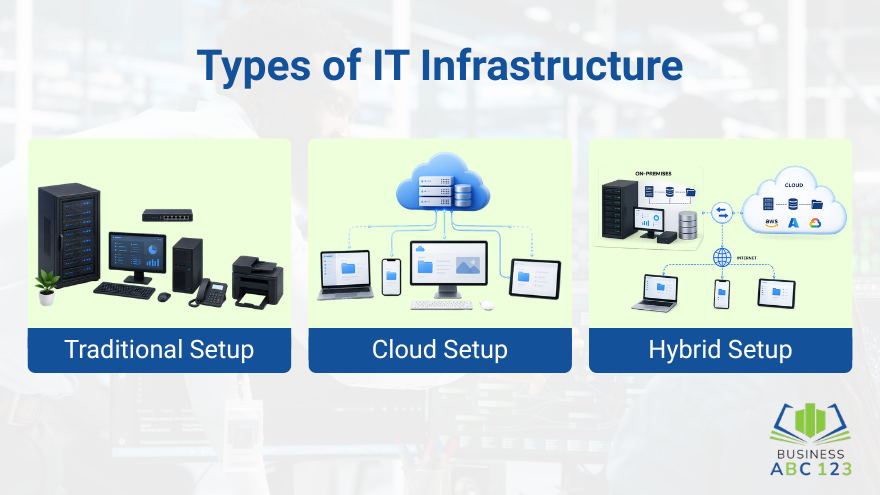
Businesses usually choose from three main setups.
1. Traditional Setup
This is where everything is stored inside the office.
- Local servers
- On-site systems
- Physical control of data
It works well for companies that want full in-house control.
2. Cloud Setup
This setup runs mostly online.
- Data stored on cloud platforms
- Access from anywhere
- Less physical hardware needed
It is common for remote teams and growing businesses.
3. Hybrid Setup
This is a mix of both.
- Some systems on-site
- Some systems in the cloud
Many companies prefer this because it gives balance and flexibility.
How IT Infrastructure Helps Your Business
A strong IT setup supports daily work in many ways. It keeps communication smooth between teams. It also helps employees access files quickly without delays. It supports tools like email, accounting systems, and customer databases. It also improves business IT systems by reducing downtime and streamlining workflows. Using the right systems can also help grow a business with technology over time. When everything works well, teams spend less time fixing issues and more time getting real work done.
Why Good IT Infrastructure Is Important To Your Business
A strong setup brings real benefits to a business.
- Reduces system breakdowns
- Keeps data safe and accessible
- Helps employees work faster
- Supports business growth
Poor setup often leads to slow systems and lost time. That can affect customer service and team productivity. Even small issues, like weak internet or old devices, can slow down the whole business. Good IT infrastructure management helps avoid these problems.
Common Problems in IT Infrastructure
Many companies face similar issues.
- Outdated Systems: Old computers and software can slow everything down.
- Weak Network Setup: Poor internet or unstable connections affect daily work.
- Security Gaps: Weak passwords or poor protection can lead to data risks, especially when basic cyberattack defenses are not in place.
- Poor Planning: Some businesses set things up without a clear structure. That often leads to confusion later.
These problems can be avoided with proper setup and regular checks.
How to Set Up or Improve IT Infrastructure
You don’t need a complicated process. Start simple.
- Check what you already have. Look at your devices, software, and internet setup.
- List what your business needs. This depends on how your team works day-to-day.
- Then choose a setup type. It can be traditional, cloud-based, or hybrid.
- Set a budget that matches your business size.
- If needed, ask for help from IT support or service providers.
- Once everything is in place, keep checking your systems regularly.
Small updates can prevent bigger problems later.
Simple Ways to Manage IT Infrastructure
Good management keeps everything running smoothly.
- Update systems often
- Back up important files
- Monitor network performance
- Use strong passwords
- Limit access to important data
These small steps help prevent common issues. They also improve overall stability and reduce downtime.
What IT Infrastructure Will Look Like in the Future
Technology keeps changing how businesses work. More companies are moving to cloud systems because they are easier to access and manage. Automation is also becoming more common. It helps handle routine tasks without manual work. Security tools are also improving. Businesses now place greater emphasis on protecting data and systems. The goal is simple. Faster systems, safer data, and easier access for teams, along with preparing for future technology trends in business.
Final Thought
Information Technology Infrastructure is something every business depends on, even if it’s not always obvious. It supports daily work, keeps data safe, and helps systems run without constant interruptions. When properly set up, teams can work faster and with fewer problems. Businesses that take time to build a strong Information Technology Infrastructure usually find it easier to stay organized, grow steadily, and handle daily operations with less stress.
FAQs
What is information technology infrastructure?
Information technology infrastructure is the setup of hardware, software, networks, and storage systems that support a business’s daily digital operations.
How to improve information technology infrastructure?
You can improve information technology infrastructure by upgrading outdated systems, strengthening network connections, improving data storage, and regularly updating and securing software.
Why is information technology infrastructure important for businesses?
It is important because it keeps systems running smoothly, supports communication, protects data, and helps employees work without delays or disruptions.
What are the main parts of information technology infrastructure?
The main components include hardware like computers and servers, software applications, network systems, data storage, and cloud services.
What problems can happen with a poor information technology infrastructure?
Poor infrastructure can lead to slow systems, frequent downtime, data loss, security risks, and reduced productivity across the business.